This is the full developer documentation for miu-db
# Introduction
> A headless database CLI for humans and agents.

[](https://github.com/vanducng/miu-db/releases)
**miu-db** gives you and your coding agent one way into every database you use. The `miudb` binary keeps saved connections, secrets, SSH tunnels, query paging, schema inspection, and ERDs in one local Go core, and prints stable JSON on stdout.
```sh
curl -fsSL https://db.miu.sh/install.sh | sh
miudb connections add --name app --db-type sqlite --path ./app.db
miudb query run --connection app --sql 'select 1 as one' -o pretty
```
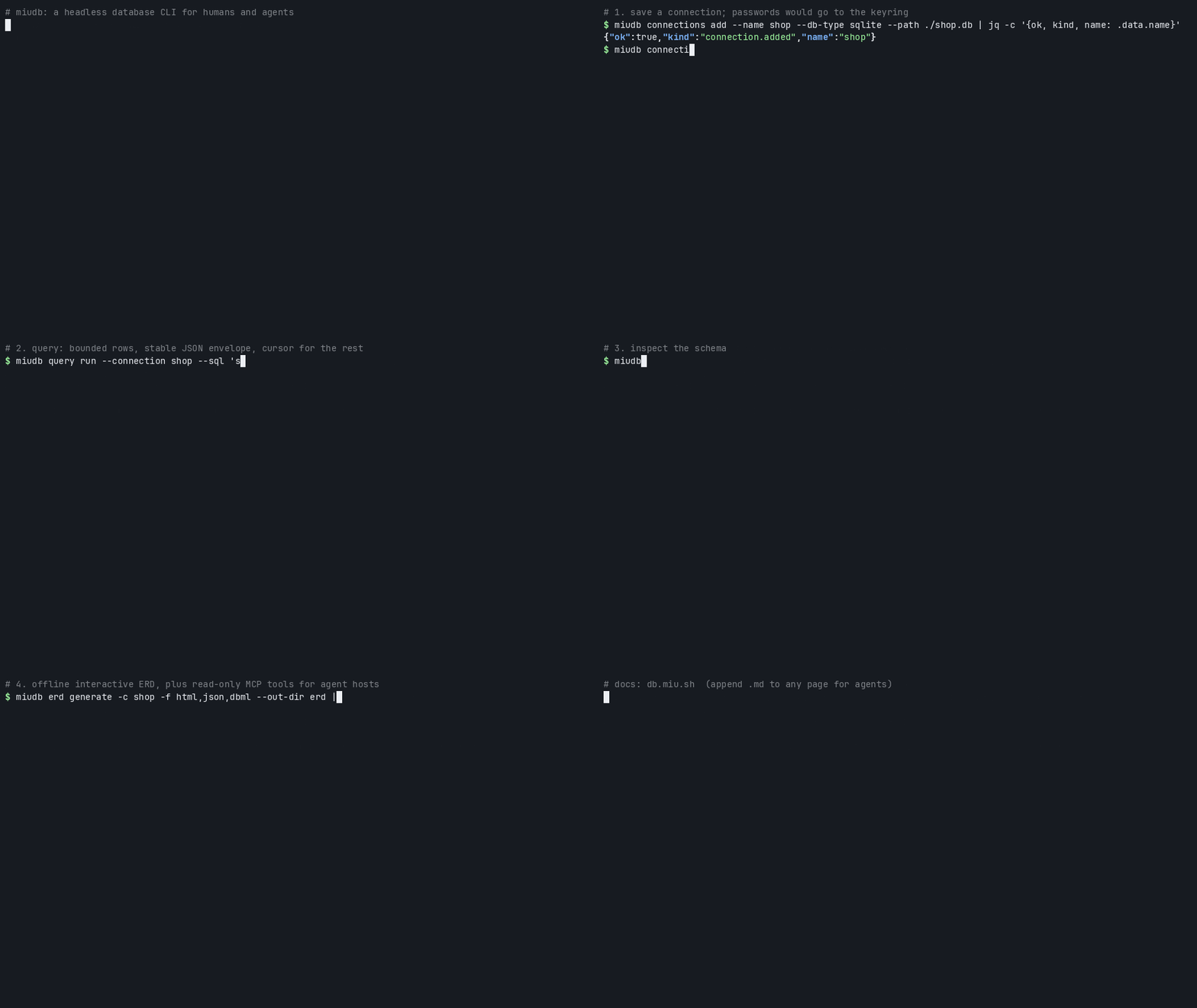
New here? [Getting started](/onboarding/) takes five minutes.
## What it does
[Section titled “What it does”](#what-it-does)
| Need | How | Page |
| -------------------------- | --------------------------------------------------- | ---------------------------------------- |
| Save and share connections | `connections add`, `import`; secrets in the keyring | [Connections and queries](/usage/) |
| Query safely | Bounded rows, cursor pages, per-call `--session` | [Connections and queries](/usage/#query) |
| Cloud warehouses | Snowflake OAuth or key pair, BigQuery ADC | [Authentication](/authentication/) |
| See a schema | `schema tree`, interactive offline ERD | [ERD diagrams](/erd/) |
| Give an agent tools | `miudb mcp serve`, read-only by default | [MCP server](/mcp/) |
| Audit what ran | JSONL activity log, no result rows | [Activity log](/activity/) |
Adapters: SQLite, PostgreSQL, MySQL, Snowflake, BigQuery. SSH tunnels for Postgres and MySQL. A Neovim client lives in `ui/miu-db.nvim`.
## For agents
[Section titled “For agents”](#for-agents)
* Every command prints the stable `miudb.cli/v1` JSON envelope on stdout. See [Agent CLI contract](/cli-contract/).
* Every docs page is also raw Markdown: append `.md` to its URL, for example [`/onboarding.md`](/onboarding.md).
* Indexes: [`/llms.txt`](/llms.txt), [`/llms-full.txt`](/llms-full.txt).
* Skill: [`/skill.md`](/skill.md).
MIT. Source: [github.com/vanducng/miu-db](https://github.com/vanducng/miu-db).
# Activity log
> Every query, exec, and schema call is logged as JSONL metadata. Browse, prune, or turn it off.
Every `query run`, `schema tree`, and `erd` call from the CLI, and every `query_run` and `schema_tree` call through the MCP server, writes one JSONL event to:
```text
~/.config/miu/db/activity//.jsonl
```
An event holds the SQL text, `sql_shape` (literals replaced with `?`), connection, group, `db_type`, op, latency, `rows_returned`, source (`cli` or `mcp`), and error info. Result rows are never stored. `query script` and the native `miudb serve` protocol are not logged.
## Browse
[Section titled “Browse”](#browse)
```sh
miudb activity --since 24h -o pretty
miudb activity --connection team/app --since 7d
miudb activity --failed --since 24h
miudb activity --session # one trace, across date directories
```
| Flag | Effect |
| -------------- | ---------------------------------------------- |
| `--since` | Newer than a duration: `1h`, `24h`, `7d`, `2w` |
| `--connection` | Bare name or `group/name` |
| `--group` | One group |
| `--failed` | Only events with errors |
| `--session` | One session id |
| `--limit` | Max events, `0` for no cap |
## Prune
[Section titled “Prune”](#prune)
```sh
miudb activity prune --older-than 30d --dry-run
miudb activity prune --older-than 30d
```
## Turn it off
[Section titled “Turn it off”](#turn-it-off)
| Scope | How |
| -------------------------------- | ---------------------------------------------------------------------------------------------------------- |
| One call | `--no-activity-log` |
| Everywhere | `MIUDB_ACTIVITY_LOG=off` |
| One connection, keep shapes only | `"log_sql": false` on the connection in `connections.json`. `sql_shape` is still recorded; raw SQL is not. |
The activity `session_id` is minted per CLI call or MCP server start. It is unrelated to `query run --session key=value`, which sets per-call database context.
## Query it with DuckDB
[Section titled “Query it with DuckDB”](#query-it-with-duckdb)
```sql
select session_id, connection, op, sql_shape, latency_ms, rows_returned, ts
from read_json_auto('~/.config/miu/db/activity/**/*.jsonl')
order by ts desc
limit 100;
```
# Architecture
> How the CLI, MCP server, and stdio protocol share one Go core, plus package boundaries, stores, and the tech stack.
miudb is one pure-Go static binary (`CGO_ENABLED=0` in releases). Three entry points share one service layer, `core.Services`, which resolves a connection, opens it through an adapter, bounds the result, and logs the call.
[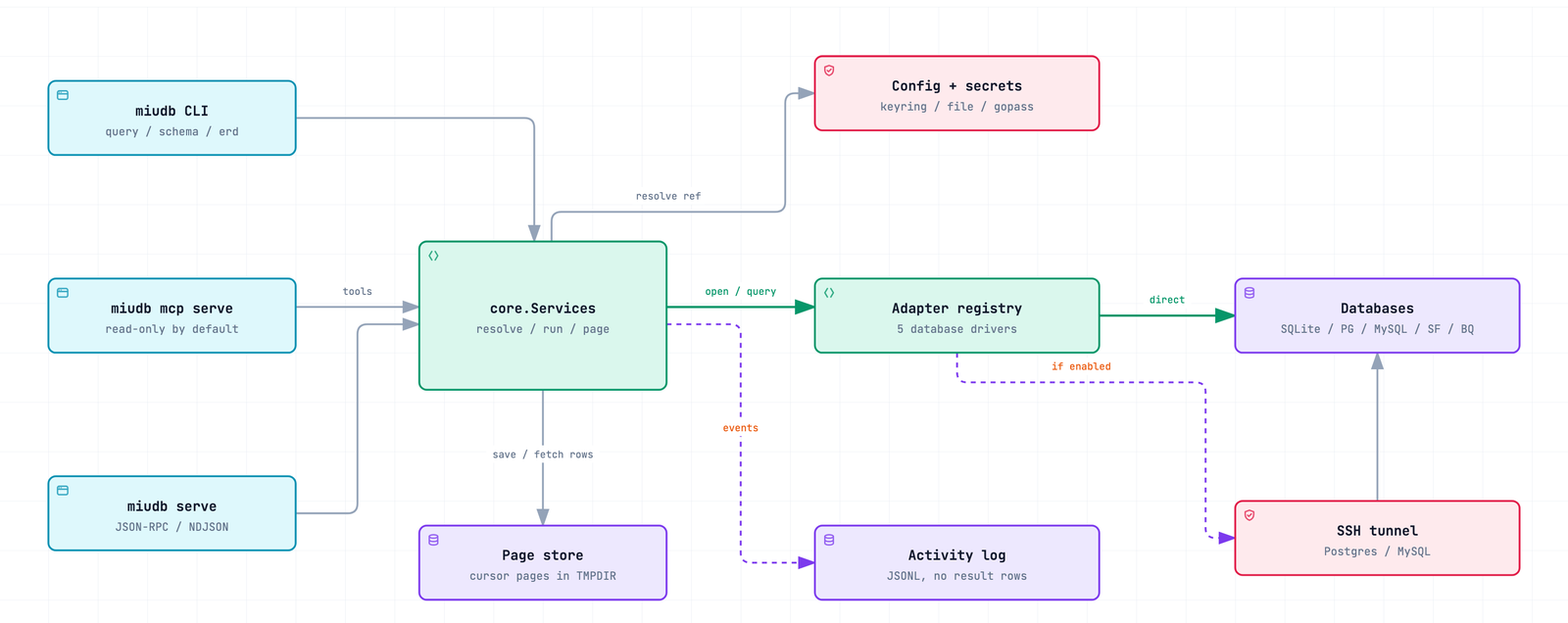 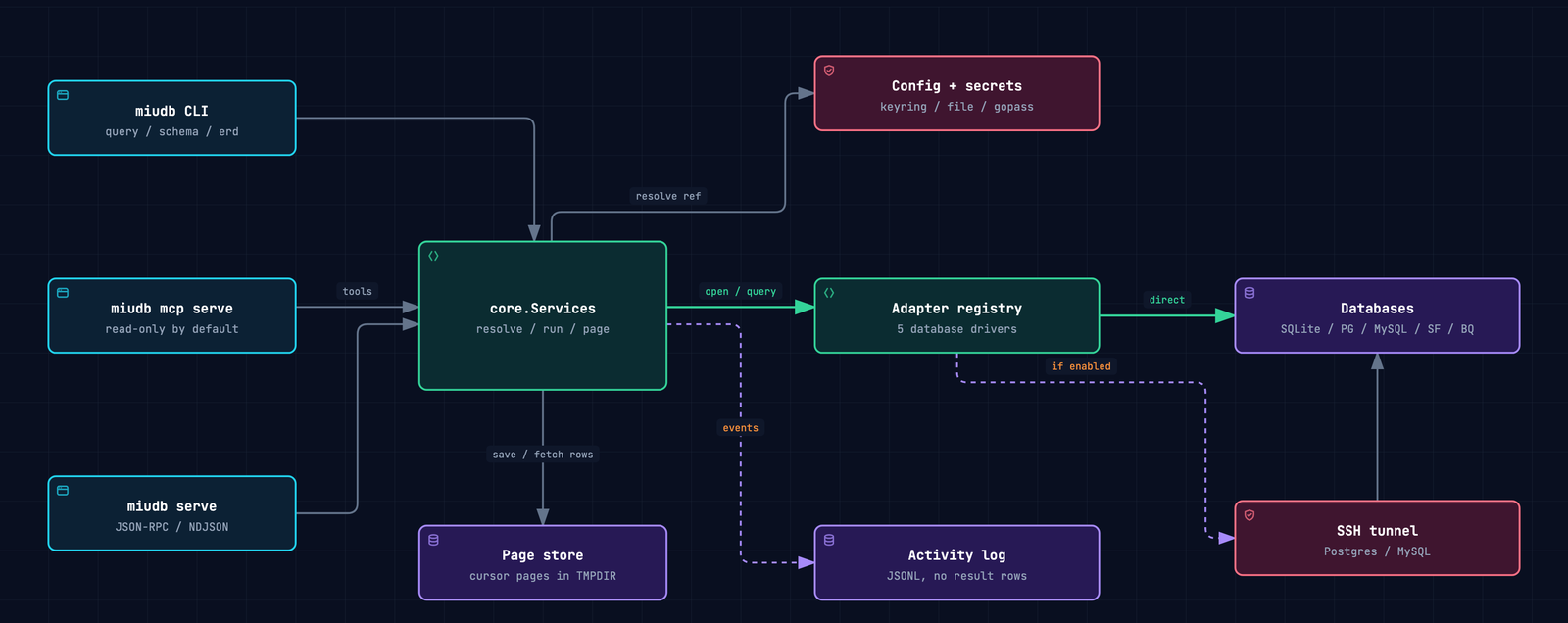](/diagrams/architecture.html)
Click the diagram for the interactive version.
## Packages
[Section titled “Packages”](#packages)
| Layer | Package | Job |
| -------- | ----------------------------------------- | ----------------------------------------------------------------------------------------------------------- |
| Entry | `cmd/miudb`, `internal/cli` | Cobra commands, flags, the `miudb.cli/v1` envelope, exit codes, `upgrade` |
| Entry | `internal/mcpserver` | MCP stdio tools and resources, read-only guard, allowlist, byte caps, signed cursors |
| Entry | `internal/protocol` | `miudb serve`: JSON-RPC or NDJSON over stdio with call events |
| Core | `internal/core` | `Services`: the one seam the three entry points call |
| Config | `internal/config` | Connection store, `SecretRef` resolvers (keyring, file, gopass, command, env), OAuth token store, redaction |
| Auth | `internal/auth` | Snowflake OAuth loopback flow with PKCE |
| Query | `internal/query`, `internal/result` | Run, script, and page; leftover rows saved under `$TMPDIR/miudb-pages` |
| Adapters | `internal/adapter`, `internal/adapters/*` | Provider interface and registry; SQLite, Postgres, MySQL, Snowflake, BigQuery |
| Tunnel | `internal/tunnel` | SSH local forwards for Postgres and MySQL, `~/.ssh/config` aliases |
| Schema | `internal/schema`, `internal/erd` | Schema tree; ERD introspection (SQLite, Postgres, MySQL), HTML, DBML |
| Activity | `internal/activity` | JSONL event writer and reader |
| Client | `ui/miu-db.nvim` | Neovim client over `miudb serve`; SQL stays in normal buffers |
Rules that keep the layers honest:
* Entry points hold no database logic; they call `core.Services`.
* Frontends, including the Neovim plugin, never import adapter internals.
* Raw credentials are never logged or serialized. Errors and envelopes pass through the redaction helpers in `internal/config` and the output scrubber in `internal/cli`.
* New connections store secrets through `SecretRef` providers, not inline.
## Request path
[Section titled “Request path”](#request-path)
1. The entry point parses input and mints a session id for the activity log.
2. `Store.FindResolved` matches the ref (`group/name` or a unique `name`) and resolves secrets, refreshing a Snowflake OAuth token when it is within 5 minutes of expiry.
3. The registry picks the adapter by `db_type`. Postgres and MySQL open an SSH forward first when the connection has a tunnel.
4. The query service runs the SQL, keeps the first `--limit` rows, saves the rest to the page store, and returns `page.next_cursor`. Per-call `--session` keys are overlaid on a copy of the connection options, never saved.
5. The service writes one activity event, and the entry point renders the envelope or MCP result.
## Tech stack
[Section titled “Tech stack”](#tech-stack)
| Area | Choice |
| -------- | ---------------------------------------------------------------------------------------------------------------------- |
| Language | Go 1.25, module `github.com/vanducng/miu-db` |
| CLI | Cobra |
| MCP | `modelcontextprotocol/go-sdk`, stdio transport |
| Drivers | `modernc.org/sqlite`, `jackc/pgx/v5`, `go-sql-driver/mysql`, `snowflakedb/gosnowflake`, `cloud.google.com/go/bigquery` |
| Secrets | `99designs/keyring` (encrypted file backend without cgo), optional `gopass` CLI |
| Tunnels | `golang.org/x/crypto/ssh` |
| Tests | Table tests, JSON Schema contract checks (`santhosh-tekuri/jsonschema`), env-gated live-DB tests |
| Release | release-please, GoReleaser, Homebrew tap `vanducng/tap` |
| Docs | Astro Starlight on GitHub Pages |
# Authentication
> Snowflake OAuth and key-pair auth, BigQuery ADC and service accounts, and how tokens are stored.
| Backend | Auth | One-time step |
| --------------- | --------------------------------------------------------- | ----------------------------------------------------------------------------------- |
| Postgres, MySQL | Password | `--password` at `connections add`, stored per [secret store](/usage/#secret-stores) |
| Snowflake | Password, key pair (JWT), or OAuth | OAuth: `miudb auth login ` |
| BigQuery | Application Default Credentials or a service-account file | `gcloud auth application-default login` |
## Snowflake
[Section titled “Snowflake”](#snowflake)
`--host` is the account, `--username` the user. Optional `--option` keys: `warehouse`, `role`, `database`, `schema`.
### Key pair (JWT)
[Section titled “Key pair (JWT)”](#key-pair-jwt)
```sh
miudb connections add --name wh --db-type snowflake \
--host --username \
--option authenticator=snowflake_jwt \
--option private_key_file=~/.ssh/snowflake_key.p8 \
--option warehouse=DEV_WH
```
The key must be an unencrypted PKCS#8 PEM file.
### OAuth
[Section titled “OAuth”](#oauth)
`miudb auth login ` opens the browser, listens on `http://localhost:8085/`, and completes an authorization-code flow with PKCE (S256). The access and refresh tokens go to the keyring under the `miudb` service. Every later `query run` or `connections test` refreshes the access token when it is within 5 minutes of expiry, so you log in again only when the refresh token expires.
Admin setup, once per account. A public client needs no secret:
```sql
CREATE SECURITY INTEGRATION miudb_oauth
TYPE = OAUTH
OAUTH_CLIENT = CUSTOM
OAUTH_CLIENT_TYPE = 'PUBLIC'
OAUTH_REDIRECT_URI = 'http://localhost:8085/'
OAUTH_ISSUE_REFRESH_TOKENS = TRUE
OAUTH_REFRESH_TOKEN_VALIDITY = 86400
ENABLED = TRUE;
SELECT SYSTEM$SHOW_OAUTH_CLIENT_SECRETS('MIUDB_OAUTH'); -- copy OAUTH_CLIENT_ID
```
Add the connection (no `--password`), then log in:
```sh
miudb connections add --name sf-prod --db-type snowflake \
--host .snowflakecomputing.com --username \
--option authenticator=oauth \
--option oauth_client_id= \
--option oauth_authorization_url=https://.snowflakecomputing.com/oauth/authorize \
--option oauth_token_request_url=https://.snowflakecomputing.com/oauth/token-request \
--option oauth_scope=session:role:ANALYST
miudb auth login sf-prod
miudb auth status sf-prod
miudb auth logout sf-prod
```
| Option | Required | Default | Notes |
| ------------------------- | -------- | ------------------------ | -------------------------------------------------------------- |
| `authenticator` | yes | | `oauth` |
| `oauth_client_id` | yes | | From the security integration |
| `oauth_authorization_url` | yes | | `https://.snowflakecomputing.com/oauth/authorize` |
| `oauth_token_request_url` | yes | | `https://.snowflakecomputing.com/oauth/token-request` |
| `oauth_redirect_uri` | no | `http://localhost:8085/` | Must match `OAUTH_REDIRECT_URI` |
| `oauth_scope` | no | | Comma-separated, for example `session:role:ANALYST` |
| `oauth_client_secret` | no | | Confidential clients only. Prefer a public client with PKCE. |
## BigQuery
[Section titled “BigQuery”](#bigquery)
`--host` is the GCP project billed for queries.
```sh
gcloud auth application-default login
miudb connections add --name bq --db-type bigquery --host my-gcp-project
```
| Option | Default | Notes |
| --------------------------- | ------- | ------------------------------------------------------------------------------------- |
| `auth_method` | `adc` | `adc` or `service_account`. Anything else fails. |
| `bigquery_credentials_path` | | Service-account JSON. Required for `service_account`; with `adc` it is used when set. |
| `bigquery_quota_project` | | Project charged for quota |
Without credentials, queries fail with `BigQuery: no credentials found` and the fix: run the gcloud login, or set `bigquery_credentials_path` or `GOOGLE_APPLICATION_CREDENTIALS`. There is no `miudb auth login` for BigQuery.
## Secret handling
[Section titled “Secret handling”](#secret-handling)
* `oauth_client_secret` is redacted in every output and listed under `sensitive_targets`.
* The access token is injected in memory at query time. It is never written to `connections.json` and never printed.
* Refresh tokens live in the keyring under the `miudb` service.
# Agent CLI contract
> The miudb.cli/v1 JSON envelope, exit codes, error codes, redaction, and command discovery for agents.
Every command prints one JSON envelope on stdout. Stderr is diagnostics only. `-o pretty` indents the same envelope for humans; agents keep the default compact `json`.
## Envelope
[Section titled “Envelope”](#envelope)
```json
{
"ok": true,
"api_version": "miudb.cli/v1",
"kind": "query.result",
"command": "query run",
"request_id": "req_...",
"summary": { "connection": "app", "db_type": "sqlite" },
"data": {
"connection": "app",
"result": {
"columns": [{ "name": "id", "type": "INTEGER", "nullable": true }],
"rows": [[1], [2]],
"truncated": true
}
},
"page": { "limit": 2, "next_cursor": "..." },
"artifacts": [],
"warnings": []
}
```
* `summary`, `data`, `page`, and `stats` are omitted when empty. `artifacts` and `warnings` are always arrays.
* Rows are positional arrays matching `columns`. `truncated: true` with `page.next_cursor` means `query fetch-page --cursor` has more.
* `erd` commands list written files in `artifacts`.
On failure `ok` is `false`, `kind` is `error`, and there is no `data`:
```json
{ "ok": false, "kind": "error", "command": "query run",
"error": { "code": "connection.not_found", "message": "connection not found", "retryable": false } }
```
`error` may also carry `hint`, `safe_to_retry`, and `details`.
One exception: when a statement in `query script` fails, the envelope keeps `kind: query.script_result` with `ok: false`, no `error` object, and `data.results` plus `data.errors` for the statements that ran. The exit code is 2.
## Exit codes
[Section titled “Exit codes”](#exit-codes)
| Exit | Meaning |
| ---- | ----------------------------------------------------------------------------------------------------------------------------- |
| `0` | Success. Also `connections smoke` with failed connections: read `data.results[].ok` and `summary.failed`. |
| `2` | Bad input or a known failure: `connection.not_found`, invalid flags or options, unsupported script or session key, ERD errors |
| `1` | Everything else, including driver errors (`internal.error`), unknown flags, and failed upgrades |
Always branch on `ok`, not only the exit code.
## Common error codes
[Section titled “Common error codes”](#common-error-codes)
| Code | Meaning |
| ------------------------------------------------------------------ | ----------------------------------------------------------------------- |
| `connection.not_found` | No connection with that ref. List them with `connections list --basic`. |
| `connection.missing_input`, `connection.invalid_option` | `connections add` input is incomplete or malformed |
| `connection.import_unreadable`, `connection.import_empty` | The import file cannot be read or has no connections |
| `query.missing_input`, `query.missing_cursor` | `--sql` or `--cursor` missing |
| `query.multi_statement_not_allowed` | Several statements sent to `query run`; use `query script` |
| `query.script_unsupported` | Script on SQLite, Postgres, or BigQuery |
| `query.unsupported_session_key` | `--session` key the provider does not accept |
| `erd.unsupported_db`, `erd.missing_connection`, `erd.meta_invalid` | ERD input errors |
| `activity.invalid_since`, `activity.invalid_older_than` | Bad duration |
| `upgrade.managed_install` | Installed by Homebrew; use `brew upgrade miudb` |
| `internal.error` | Driver or unexpected error; the message says what failed |
## Redaction
[Section titled “Redaction”](#redaction)
Credential-named fields (`password`, `secret`, `token`, `private_key`, `api_key`, and similar), password-bearing URLs, and `key=secret` assignments are replaced before anything reaches stdout. `connections list` shows `has_password: true`, never the value. Query values are not masked; they are the user’s data.
## Discovery
[Section titled “Discovery”](#discovery)
```sh
miudb commands # catalog: name, summary, stability, mutates, side effects
miudb describe query run # one command
miudb connections list --basic # refs to pass to --connection
```
## Other transports
[Section titled “Other transports”](#other-transports)
| Command | For |
| ----------------------------------- | ------------------------------------------------------------------------------ |
| `miudb mcp serve --transport stdio` | MCP hosts. See [MCP server](/mcp/). |
| `miudb serve --protocol jsonrpc` | JSON-RPC 2.0 over stdio with call-event notifications (Neovim, custom clients) |
| `miudb serve --protocol ndjson` | One line-delimited envelope per request, response, and event |
Neither `serve` mode writes human progress to stdout.
# Development
> Build, test, and release miu-db, and deploy the docs site.
## Local checks
[Section titled “Local checks”](#local-checks)
```sh
go test ./...
go test ./tests/go -run TestMCPCommandTransportSQLiteFlow -count=1
go build -buildvcs=false -o ./.miu-db/miudb ./cmd/miudb
./.miu-db/miudb commands
```
CI (`go-ci.yml`) runs the same tests with `GOFLAGS=-buildvcs=false`. Live-DB tests read a DSN from `MIUDB_TEST_MYSQL_DSN` or `MIUDB_TEST_PG_DSN` and skip when it is unset.
After editing the Neovim plugin:
```sh
luac -p ui/miu-db.nvim/lua/miu_db/*.lua ui/miu-db.nvim/plugin/miu_db.lua
```
Before a release, confirm stdout stays clean when MCP fails to start:
```sh
./.miu-db/miudb mcp serve --transport bad 1>/tmp/miudb-mcp.out 2>/tmp/miudb-mcp.err || test $? -eq 2
test ! -s /tmp/miudb-mcp.out
```
## Contract rules
[Section titled “Contract rules”](#contract-rules)
* Data on stdout, diagnostics on stderr. Keep the envelope fields in [Agent CLI contract](/cli-contract/) stable: `kind`, `command`, `request_id`, `summary`, `data`, `warnings`, and typed `error`.
* Never log or serialize raw credentials. Use the redaction helpers in `internal/config`.
* Tests and docs use synthetic `users` / `products` / `orders` data only.
* A change to commands, flags, or output updates the skill at `.agents/skills/miudb/SKILL.md` in the same change.
## Release
[Section titled “Release”](#release)
release-please opens a release PR from conventional commits on `main` and merges it; the tag then runs GoReleaser in the same workflow. GoReleaser builds static Darwin, Linux, and Windows archives (`.tar.gz`, Windows `.zip`) with `checksums.txt`, publishes a GitHub release, and updates the Homebrew tap `vanducng/tap/miudb` when `HOMEBREW_TAP_GITHUB_TOKEN` is set.
The `main` branch is the Go implementation; `python-version` keeps the old Python one.
## Docs
[Section titled “Docs”](#docs)
```sh
cd docs && npm ci && npm run build # astro build -> docs/dist/
```
`docs.yml` copies `scripts/install.sh`, `scripts/install.ps1`, and the skill to the site root, builds `docs/` with `withastro/action`, and deploys to GitHub Pages (custom domain from `docs/public/CNAME`). Every page is also served as Markdown at `/.md`.
# ERD diagrams
> Turn a SQLite, Postgres, or MySQL connection into an offline interactive ER diagram, then let an agent group and describe it.
`miudb erd` introspects a live connection and writes a self-contained HTML viewer plus `schema.json`, and optionally DBML. It supports SQLite, Postgres, and MySQL; Snowflake and BigQuery return `erd.unsupported_db`. miudb never calls an LLM here; an agent adds the polish through `meta.json`.
## Commands
[Section titled “Commands”](#commands)
```sh
miudb erd generate -c app # index.html + schema.json
miudb erd generate -c app --format html,json,dbml --out-dir ./docs/erd
miudb erd generate -c app --meta ./docs/erd/meta.json # with agent polish
miudb erd serve -c app # render and open a browser
miudb erd serve --from ./docs/erd # an existing export, no database
miudb erd meta --stub -c app --out-dir ./docs/erd # scaffold meta.json
```
| Flag | Commands | Notes |
| -------------------- | --------------- | -------------------------------------------------------------------------------------------------- |
| `-c`, `--connection` | all | Required, except `serve --from` |
| `-s`, `--schema` | all | Defaults to the connection’s database. A connection without one errors with a “pass —schema” hint. |
| `--tables` | generate, serve | Comma-separated subset |
| `-m`, `--meta` | generate, serve | Path to `meta.json` |
| `-f`, `--format` | generate | `html`, `json`, `dbml`; default `html` (`schema.json` is always written) |
| `--out-dir` | generate, meta | See below |
| `--cdn` | generate, serve | Link renderer libraries from a CDN instead of inlining |
| `--title` | generate, serve | Used when `meta.title` is empty |
| `--from` | serve | Export directory or `schema.json` |
| `-p`, `--port` | serve | `0` picks a free port |
| `--no-open` | serve | Do not open the browser |
| `--stub`, `--force` | meta | `--stub` is required; `--force` overwrites |
Default `--out-dir`, first match wins: `$VD_VISUALS_PATH/-erd`, then `/.work/visuals/-erd` when `.work` exists, then `.diagrams/-erd`. The ref is flattened (`team/app` becomes `team-app-erd`), so `team/app` and `team-app` share a folder; pass `--out-dir` to keep them apart.
## The viewer
[Section titled “The viewer”](#the-viewer)
* Scroll to zoom, drag to pan, drag tables to move them (positions persist). Minimap, `Fit`, and `Re-layout` reframe.
* Click a table to spotlight its FK chain (depth selectable). Click a line to highlight both tables and the join columns. Double-click a table for the drawer: columns, types, PK/FK/audit, `ON DELETE`, incoming refs, indexes.
* Search tables and columns, filter by domain group, toggle framework tables, audit columns, and columns on nodes, hide single tables.
* **Find path**: shortest FK chain between two tables.
* **Insights**: missing PK, FK type mismatch, unindexed FK, orphans.
* **DBML**: the DBML source with a Copy button.
* **Share**: copies a link with filters and selection in the URL.
* The header counts visible and total tables, columns, and relationships. `?` lists shortcuts.
## Agent polish with meta.json
[Section titled “Agent polish with meta.json”](#agent-polish-with-metajson)
Without `meta.json` every table renders ungrouped and uncolored, and `erd generate` warns. The recipe:
1. `miudb erd meta --stub -c app --out-dir ` writes `meta.json` with detected `framework_tables` and `audit_columns`, an empty `groups`, and one empty `descriptions` entry per domain table.
2. Read `/schema.json`. FK topology, table-name prefixes, row counts, and migration file names are enough.
3. Put every non-framework table into 5-9 `groups`, one hex color each, and write one-line `descriptions` for the hub tables.
4. `miudb erd generate -c app --meta /meta.json`.
```json
{
"title": "Shop",
"database_type": "SQLite",
"groups": {
"Catalog": { "color": "#2563eb", "tables": ["products", "categories"] },
"Sales": { "color": "#16a34a", "tables": ["orders", "order_items"] }
},
"framework_tables": ["migrations"],
"audit_columns": ["created_at", "updated_at", "deleted_at"],
"classifications": { "users": "PII" },
"descriptions": { "orders": "Purchase orders placed by users" }
}
```
| Field | Purpose |
| ------------------ | --------------------------------- |
| `title` | Diagram heading |
| `database_type` | Label in the footer |
| `groups` | Colored domain swim-lanes |
| `framework_tables` | Hidden by default |
| `audit_columns` | Dimmed in column lists |
| `classifications` | Sensitivity tags such as `PII` |
| `descriptions` | One line per table in hover cards |
All fields are optional.
# Install
> Install miudb on macOS, Linux, or Windows, pin a version, and upgrade in place.
The binary is `miudb`, a single static Go build with no runtime dependencies.
## Install
[Section titled “Install”](#install)
| Platform | Command |
| -------------------- | -------------------------------------------------------- |
| macOS, Linux | `curl -fsSL https://db.miu.sh/install.sh \| sh` |
| Windows (PowerShell) | `irm https://db.miu.sh/install.ps1 \| iex` |
| Homebrew | `brew install vanducng/tap/miudb` |
| Go 1.25+ | `go install github.com/vanducng/miu-db/cmd/miudb@latest` |
Both scripts detect OS and architecture, verify the release checksum, and honor:
| Env | Default | Effect |
| ------------------- | ---------------------------------------------------- | ------------------------------------------------------------------------------------------------- |
| `MIUDB_VERSION` | `latest` | Install a specific tag, for example `v0.10.6` |
| `MIUDB_INSTALL_DIR` | `/usr/local/bin`, Windows `%LOCALAPPDATA%\miudb\bin` | Target directory. On Unix, uses `sudo` when it is not writable, else falls back to `~/.local/bin` |
With `go install`, put `$(go env GOPATH)/bin` on `PATH`.
Windows zips (`miudb_windows_x86_64.zip`, `miudb_windows_arm64.zip`) are also on [GitHub Releases](https://github.com/vanducng/miu-db/releases):
```powershell
$version = "v0.10.6"
$asset = "miudb_windows_x86_64.zip"
Invoke-WebRequest "https://github.com/vanducng/miu-db/releases/download/$version/$asset" -OutFile $asset
Expand-Archive $asset -DestinationPath ".\miudb" -Force
.\miudb\miudb.exe version
```
## Verify
[Section titled “Verify”](#verify)
```sh
miudb version
miudb commands
```
## Upgrade
[Section titled “Upgrade”](#upgrade)
```sh
miudb upgrade # latest release, checksum verified, replaces the binary
miudb upgrade --check # only report whether a newer version exists
miudb upgrade --version v0.10.6 # a specific tag
```
Homebrew installs refuse self-upgrade; use `brew upgrade miudb`.
## Agent skill
[Section titled “Agent skill”](#agent-skill)
```sh
curl -fsSL https://db.miu.sh/skill.md --create-dirs \
-o ~/.claude/skills/miudb/SKILL.md
```
Use `~/.agents/skills/miudb/SKILL.md` for Codex, Cursor, and other agents. The same file lives in the repo at `.agents/skills/miudb/SKILL.md`.
## From a checkout
[Section titled “From a checkout”](#from-a-checkout)
```sh
go build -buildvcs=false -o ./.miu-db/miudb ./cmd/miudb
./.miu-db/miudb version
```
`-buildvcs=false` avoids VCS stamping failures in git worktrees.
# MCP server
> Run miudb as a local stdio MCP server with read-only, bounded database tools for Claude Code, Codex, Cursor, and VS Code.
```sh
miudb mcp serve --transport stdio
```
The server reads the normal connection store and exposes it over stdio only; there is no HTTP transport. Stdout carries MCP frames only; diagnostics and SDK logs go to stderr. Unknown transports exit 2.
| Flag | Default | Effect |
| -------------------- | ------- | ------------------------------------------------------------- |
| `--connection [` | all | Repeat to restrict which connections are visible and callable |
| `--limit` | 100 | Default row limit for query tools |
| `--max-limit` | 1000 | Highest limit a tool call may request |
| `--max-bytes` | 1048576 | Max serialized bytes per tool or resource response |
| `--timeout` | 30s | Global connection and query timeout |
| `--allow-mutate` | off | Permit mutation SQL. Unsafe. |
## Add to a host
[Section titled “Add to a host”](#add-to-a-host)
| Host | Setup |
| ---------------- | ----------------------------------------------------------------------------- |
| Claude Code | `claude mcp add --transport stdio miudb -- miudb mcp serve --transport stdio` |
| Codex | `~/.codex/config.toml`, below |
| Cursor | `.cursor/mcp.json` (project) or `~/.cursor/mcp.json` (global) |
| VS Code, Copilot | `.vscode/mcp.json` or your user MCP config |
\~/.codex/config.toml
```toml
[mcp_servers.miudb]
command = "miudb"
args = ["mcp", "serve", "--transport", "stdio"]
startup_timeout_sec = 10
tool_timeout_sec = 60
```
Cursor and a project `.mcp.json` for Claude Code use `mcpServers`; VS Code uses `servers` with the same entry:
```json
{
"mcpServers": {
"miudb": { "type": "stdio", "command": "miudb", "args": ["mcp", "serve", "--transport", "stdio"] }
}
}
```
To pin one connection, append `"--connection", "app"` to `args`. If the host cannot find `miudb`, use the full path from `which miudb`.
## Tools
[Section titled “Tools”](#tools)
| Tool | Does |
| --------------------- | ------------------------------------------------------------------------------------ |
| `connections_list` | Redacted connections visible to this server |
| `connection_describe` | Redacted metadata for one connection |
| `connection_test` | Open one connection; may start a tunnel, runs no user SQL |
| `connections_smoke` | Bounded smoke query across visible connections or a subset |
| `schema_tree` | Tables, views, and columns for one connection |
| `query_run` | One read-only statement; columns plus row arrays and a cursor |
| `query_script` | Multi-statement script, Snowflake and MySQL only; `atomic` wraps it in a transaction |
| `query_fetch_page` | Next page for a `query_run` cursor |
Resources: `miudb://connections`, `miudb://connections/{name}`, `miudb://connections/{name}/schema`, `miudb://queries/{cursor}`. Schema resources can be large; prefer `schema_tree`.
## Safety
[Section titled “Safety”](#safety)
* `query_run` rejects mutations, uncertain multi-statements, mutating CTEs, `EXPLAIN`, and `PRAGMA` with `query.read_only_violation` unless the server runs with `--allow-mutate`.
* A mutating `query_script` needs `--allow-mutate` on the server and `allow_mutate=true` on the call (`query.mutation_not_acknowledged` otherwise). Read-only scripts always run.
* Connection output is redacted with the CLI helpers. Passwords, SSH passwords, private keys, credential file contents, and credential-bearing URLs are never serialized.
* Cursors are signed for the running server and scoped to their connection, so the `--connection` allowlist also applies to `query_fetch_page`.
* An oversized response fails with `query.output_too_large`: lower the limit, select fewer columns, or raise `--max-bytes`.
## Troubleshooting
[Section titled “Troubleshooting”](#troubleshooting)
| Symptom | Fix |
| ---------------------------- | ---------------------------------------------------------------------- |
| Host cannot start the server | Use the full path from `which miudb` |
| No tools appear | Restart the host; check its MCP panel |
| A connection is missing | Check the repeated `--connection` flags |
| `query.read_only_violation` | Use a single `select`, or restart with `--allow-mutate` if you mean it |
# Getting started
> Install miudb and its agent skill, then let your agent add a connection and run the first query.
## 1. Install
[Section titled “1. Install”](#1-install)
```sh
curl -fsSL https://db.miu.sh/install.sh | sh
curl -fsSL https://db.miu.sh/skill.md --create-dirs \
-o ~/.claude/skills/miudb/SKILL.md
```
The first line installs the `miudb` binary (checksum verified, honors `MIUDB_VERSION` and `MIUDB_INSTALL_DIR`). The second adds the agent skill. For Codex, Cursor, and other agents, save it to `~/.agents/skills/miudb/SKILL.md` instead. Homebrew, Windows, and `go install` are on [Install](/install/).
## 2. Ask your agent
[Section titled “2. Ask your agent”](#2-ask-your-agent)
Paste this into Claude Code, Codex, or any coding agent:
```text
/miudb set up miudb: list my saved connections, add a SQLite connection for
./app.db if none exists, smoke-test everything, then show me the schema.
```
No skill installed? Any agent that can fetch URLs works too:
```text
Read https://db.miu.sh/skill.md and follow it to set up miudb, add a SQLite
connection for ./app.db, and show me its schema.
```
## 3. Or do it by hand
[Section titled “3. Or do it by hand”](#3-or-do-it-by-hand)

```sh
miudb connections add --name app --db-type sqlite --path ./app.db
miudb query run --connection app --sql 'select 1 as one' -o pretty
```
Postgres, MySQL, SSH tunnels, Snowflake, and BigQuery are on [Connections and queries](/usage/) and [Authentication](/authentication/).
## Everyday commands
[Section titled “Everyday commands”](#everyday-commands)
| Goal | Command |
| ---------------------------------- | ------------------------------------------------------------------------------------------------------------------------------------------------ |
| Add a SQLite file | `miudb connections add --name app --db-type sqlite --path ./app.db` |
| Add Postgres (password to keyring) | `miudb connections add --name app --db-type postgresql --host localhost --port 5432 --database app --username app --password "$APP_DB_PASSWORD"` |
| Run one statement | `miudb query run --connection app --sql 'select * from users' --limit 50` |
| Next page of a result | `miudb query fetch-page --cursor ` |
| Tables and columns | `miudb schema tree --connection app` |
| Interactive ERD | `miudb erd serve -c app` |
| Import a teammate’s connections | `miudb connections import ./shared.json --dry-run` |
## Probe setup and usage
[Section titled “Probe setup and usage”](#probe-setup-and-usage)
| Question | Command |
| --------------------------------------- | --------------------------------------------- |
| Installed version, any update? | `miudb version` / `miudb upgrade --check` |
| Which connections exist? | `miudb connections list --basic -o pretty` |
| Is this one reachable? | `miudb connections test app` |
| Which ones are broken? | `miudb connections smoke --timeout 20s` |
| What did I or my agent run? | `miudb activity --since 24h -o pretty` |
| Only the failures | `miudb activity --failed --since 7d` |
| Which commands exist, machine-readable? | `miudb commands` / `miudb describe query run` |
| Any flag | `miudb --help` |
Every command prints the `miudb.cli/v1` JSON envelope by default. Use `-o pretty` to read it yourself; agents should parse the JSON.
## Next
[Section titled “Next”](#next)
* [Connections and queries](/usage/): secret stores, tunnels, import, sessions, scripts, paging.
* [MCP server](/mcp/): give Claude Code, Codex, Cursor, or VS Code read-only database tools.
* [ERD diagrams](/erd/): offline interactive diagrams your agent can polish.
* [Agent CLI contract](/cli-contract/): envelope, exit codes, redaction.
* Agents: append `.md` to any page URL for raw Markdown, for example [`/usage.md`](/usage.md), or start from [`/llms.txt`](/llms.txt).
# Connections and queries
> Add, store, share, and test connections, then run bounded queries, scripts, and schema inspection.
## Where config lives
[Section titled “Where config lives”](#where-config-lives)
| Path | Holds |
| ----------------------------------- | ------------------------------------------------------------------------------------------------------------ |
| `~/.config/miu/db/connections.json` | Connection metadata. No secrets unless `--secret-store inline`. |
| `~/.config/miu/db/credentials.json` | `file` secret store, mode `0600`. Falls back to `credentials-export.json` in the same directory when absent. |
| `~/.config/miu/db/keyring/` | Encrypted file keyring used by release builds (see below). |
| `~/.config/miu/db/activity/` | [Activity log](/activity/). |
Override the directory with `MIUDB_CONFIG_DIR` or `--config-dir`. Other global store flags: `--connections-file`, `--credentials-file`, `--secret-source` (`file,keyring,gopass,none`), `--keyring-service` (default `miudb`), `--gopass-prefix` (default `miudb`). Only pass them for a non-default store.
## Add a connection
[Section titled “Add a connection”](#add-a-connection)
```sh
miudb connections add --name app --db-type sqlite --path ./app.db
miudb connections add --name app-dev --db-type postgresql \
--host localhost --port 5432 --database app --username app \
--password "$APP_DB_PASSWORD"
miudb connections add --name app-prod --group team --db-type mysql \
--host db.internal.example --port 3306 --database app --username app \
--password "$APP_DB_PASSWORD" --tunnel --ssh-config-alias bastion
```
| Flag | Notes |
| -------------------- | --------------------------------------------------------------------------------------------------------------------------------------- |
| `--db-type` | `sqlite`, `postgresql`, `mysql`, `snowflake`, `bigquery` |
| `--group` | Nested paths allowed (`team/project`). `--folder` is a deprecated alias. |
| `--url` | Connection URL instead of host/port/database |
| `--password-command` | Command that prints the password at connect time. Use only commands you trust. |
| `--option k=v` | Provider settings, repeatable. Snowflake and BigQuery keys: [Authentication](/authentication/). |
| `--extra-option k=v` | Driver extra options, for example `sslmode=require` |
| `--tunnel` | SSH tunnel. Use `--ssh-config-alias`, or `--ssh-host`, `--ssh-port` (default 22), `--ssh-username`, `--ssh-key-path`, `--ssh-password`. |
| `--secret-store` | Where passwords go: `keyring` (default), `file`, `inline`, `none` |
Full list: `miudb connections add --help`.
### Secret stores
[Section titled “Secret stores”](#secret-stores)
| Store | Behavior |
| --------- | ------------------------------------------------------------------------------------------------------------------------------------------------------------------------------------------------------------------- |
| `keyring` | OS keychain service `miudb` on cgo builds. Release binaries are built without cgo and use an encrypted file keyring at `~/.config/miu/db/keyring/:` instead, so the macOS Keychain shows nothing. |
| `file` | `credentials.json`, mode `0600` |
| `inline` | Kept in `connections.json` |
| `none` | Discarded; another resolver must supply it |
At query time secrets resolve from the file store, the keyring, and `gopass` paths under the `miudb` prefix. `connections list` shows `has_password: true`, never the value; `connections test` proves the secret resolves.
## Address a connection
[Section titled “Address a connection”](#address-a-connection)
`miudb connections list --basic` prints `ref`, `name`, `group`, `db_type`, and `host`. Pass the `ref` to `--connection`: `group/name`, or the bare `name` when it is unique. `-c` is a short form only on `erd` commands.
## Share and import
[Section titled “Share and import”](#share-and-import)
```sh
miudb connections import ./shared.json --dry-run # preview added and overwritten
miudb connections import ./shared.json
```
Import merges by `name`: a matching name is overwritten, and the existing `connections.json` is first copied to `connections.json.bak-`. Secrets import as they appear in the file; a file with inline passwords is plaintext, so keep it `0600` and share it over a secure channel.
## Test
[Section titled “Test”](#test)
```sh
miudb connections test app-dev # open one connection, no user SQL
miudb connections smoke --timeout 20s # every connection, one envelope
miudb connections smoke --connection a --connection b --sql 'select 1'
```
`smoke` runs `select 1 as one` with `--concurrency 4` by default. It exits 0 even when some connections fail; read `data.results[].ok` and `summary.failed`. Local connections fail when their database is stopped; compare tunnel failures against a known-good client before calling it a miudb bug.
## Query
[Section titled “Query”](#query)
```sh
miudb query run --connection app --sql 'select * from orders' --limit 100
miudb query fetch-page --cursor
```
`query run` executes one statement. `--limit` (global, default 100) bounds the inline rows; when more exist the result has `truncated: true` and `page.next_cursor`. `--timeout` (global, default 30s) bounds the connection and query. `query run` does not block mutations; the read-only guard is in [MCP](/mcp/).
### Scripts
[Section titled “Scripts”](#scripts)
```sh
miudb query script --connection wh --sql "show users like 'alice'; show roles"
```
Snowflake and MySQL only. Returns `data.results`, one entry per statement with `kind` `rows` or `exec`. Fails fast; `--atomic` wraps the script in a transaction (DML-only atomicity). SQLite, Postgres, and BigQuery return `query.script_unsupported`.
### Per-call session
[Section titled “Per-call session”](#per-call-session)
`--session key=value` (repeatable, on `query run` and `query script`) sets context for one call only. Unsupported keys fail with `query.unsupported_session_key`.
| Provider | Keys |
| --------- | -------------------------------------------------------------- |
| Snowflake | `role`, `warehouse`, `database`, `schema` |
| Postgres | `role`, `search_path`, `statement_timeout`, `application_name` |
| MySQL | `sql_mode`, `time_zone`, `max_execution_time` |
| BigQuery | `bigquery_location`, `bigquery_maximum_bytes_billed` |
## Schema
[Section titled “Schema”](#schema)
```sh
miudb schema tree --connection app
```
Returns tables, views, and columns. Metadata SQL through `query run` also works: `information_schema` on Postgres and Snowflake, `SHOW TABLES` / `DESCRIBE` on MySQL, `INFORMATION_SCHEMA` on BigQuery, `sqlite_master` and `PRAGMA table_info` on SQLite. For a diagram, see [ERD](/erd/).]